
What is a before and after slider?
A before and after slider puts two photos of the same job on top of each other. Visitors drag across to see the difference you made.
Some features come with your website. See prices
What it does3 points
Show the difference you make.
Your own work, side by side.
- Drag, tap or use the arrow keys.
- Your photos, compressed for each screen, so the page stays fast.
- Clinics: get written consent for every photo, and check your college’s advertising rules before you post results.
Try itTry it here

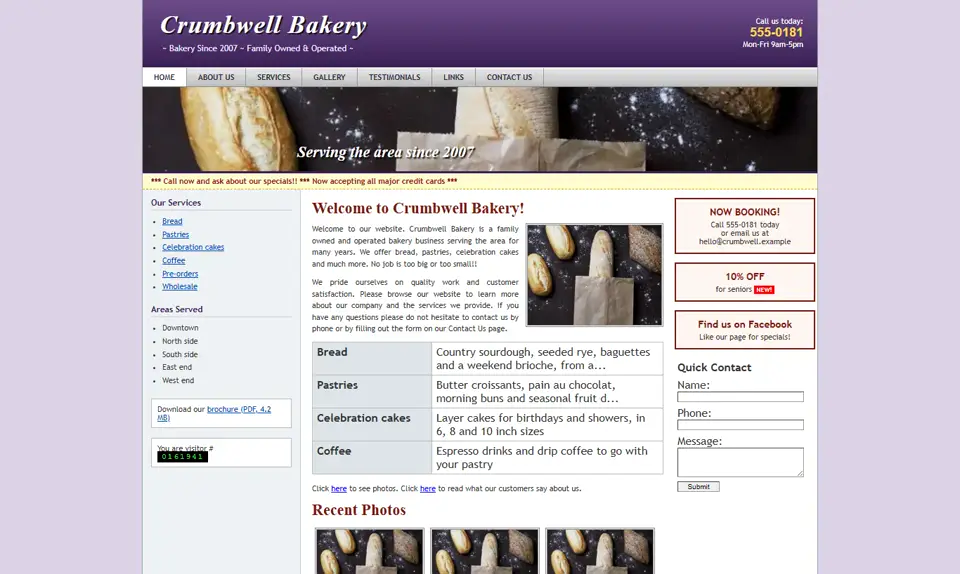
Drag across to compare. Shown on Crumbwell Bakery, an invented business: its old website and its new one.
Good for6 businesses
Who uses it.
Each one opens its own industry page.
- Med spas: show a treatment result side by side, with consent.
- Dentists: a smile before and after, with consent.
- Teeth whitening studios: show a real result side by side.
- Renovation contractors: the kitchen before and after.
- Auto detailers: the paint before and after.
- Landscapers: the yard before and after.
When it’s not the right fitCheck first
It’s not the right fit if you don’t have before photos of your own work. Stock photos and other people’s results don’t belong in it.
How it works4 steps
- 01
Free demo
Tell us about your business. You get a free demo and a flat price in writing within 24 hours.
- 02
Your photos
Send pairs taken from the same spot, in the same light.
- 03
Build
We line up each pair and add the slider to your page.
- 04
Live
Visitors drag across your work on any phone or computer.
PriceFree
The before and after slider is free on every website we build. See website prices.
Questions6 answers
It is free on every website we build.
Two photos of the same job, from the same spot and in the same light. Phone photos are fine if they are sharp.
Only with the patient’s written consent, and within your college’s advertising rules. Check those rules before you post.
Yes. Visitors drag with a finger. It also works with a mouse and with the arrow keys.
Tell us how many pairs you want to show, and we confirm it in your written quote.
No. The photos are compressed for each screen and load as you scroll.
Every featureFree demo first
See it on your own site.
Tell us which features you want. We send a free demo of your own site and a flat quote in writing within 24 hours.
